Ctify_ v26.6.2
Foldered preformatted text block
One of the long-time problems that I frequently encounter in PmWiki is that it can’t keep the formatting as it is, especially regarding newlines.
Sometimes, I just want to save text as it is, especially when making a simple list. Instead of adding tedious bullet points for each item, I’d rather simply put newlines like usual. But the PmWiki engine strips these newlines and reinterprets everything.
To temporarily fix that, I use a certain built-in PmWiki syntax: [@ ... @]. This is called a “preformatted text block”. It’s derived from the built-in native HTML tag `<pre>`, which preserves all spaces, tabs, and line breaks exactly as they are typed in the source code.
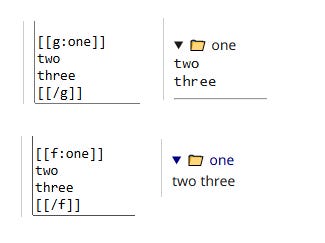
Lately, I have frequently used the folder + preformatted text block combination tag in order to store lot of lists. Something like :
[[f:folderName]][@ .... @][[/f]] This so is tedious.
So, to simplify it, I combined them into this:
[[g:folderName]] ... [[/g]]// local/config.php
Markup('g-open', 'directives',
'/\\[\\[g:(.*?)\\]\\]/i',
function($m) {
$title = htmlspecialchars(trim($m[1]), ENT_QUOTES);
return Keep("<details class='tvt-folder'>\n<summary><span class='folder-icon'>📁</span> {$title}</summary>\n<div class='folder-content'>\n<pre class='escaped'>");
}
);
// Define the [[/folder]] closing tag
Markup('g-close', 'directives',
'/\\[\\[\/g\\]\\]/i',
function($m) {
return Keep("</pre>\n</div>\n</details>");
}
);